
A calmer operating system for peak days
Keep prepared guests moving. Give exceptions real help.
Move repeated work before arrival, guide prepared guests through a clear lane, and keep manual recovery available for every exception.
RecSystems helps rental operators speed up peak-day check-ins by moving repeatable work before arrival, giving prepared guests a QR or manual fast lane, and keeping exceptions in a separate human-help path.
$0/month · 10% per completed booking · no credit card · launch alongside your current system
See your result first. QR is optional. Manual lookup stays. No fabricated time savings.
Actual product · synthetic demo data
Before arrival Preparation complete
Ready lane QR or manual lookup
Exception lane Focused human help

A controlled comparison
Same rentals. Same staff. Different system.
The business is busy in both versions. What changes is how much searching, signing, paying, explaining, and checking begins at the exact same moment. Peak volume does not invent repeated work; it multiplies the process already in place.
Two healthy paths
Prepared guests should not wait behind unprepared ones.
A booking-specific QR code can open the correct record and confirm readiness. Manual lookup remains equally available. Guests with missing information or unusual needs enter a visible help path where staff can focus without blocking the normal flow.
-
QR fast lane
-
Text and manual lookup fallback
-
Focused exception assistance
The arrival flow
Move repeated work out of the busiest hour.
Arrivals
Ready lane
0Help lane
0Every exception blocks every prepared guest.
Illustrative simulation. This explains the workflow and does not claim a guaranteed revenue, time, or staffing result.
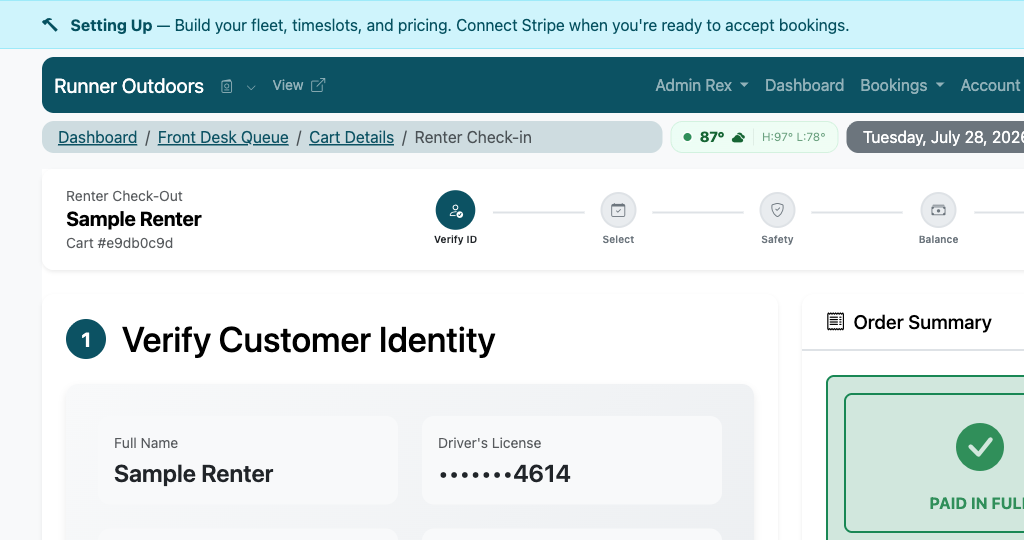
Actual staff product
This is the check-in screen staff use at the counter.
The current five-step workflow moves from identity verification through booking selection, safety, balance, and completion. The screenshot uses masked and synthetic demo data. The booking shown is a demo reservation, not a claim about your fleet.
Product proof uses synthetic demo data. The workflow is RecSystems; the unit shown may not match your fleet.
Actual product UI · synthetic demo data
“RecSystems has really transformed our boat rental system. It has increased our revenue and saved us numerous hours to focus on other aspects of our business.”
Map the peak-day flow
Which work belongs before arrival, at the counter, or in the exception lane?
Classify six common steps and receive a directional bottleneck result without fabricated wait-time claims.
Answer for your busiest arrival window.
Your result appears before signup.
We pass only the result tier—not raw answers, business details, or PII.
Keep control
Faster does not mean rushed, inaccessible, or perfect.
QR remains optional, manual lookup remains available, safety and identity checks stay with staff, and the simulation never turns directional process changes into fabricated time savings.
- Manual and accessible fallback
- Visible exception recovery
- No unsupported throughput promise
The offer, before you switch anything
Start at $0/month. Pay 10% only when a booking completes.
No credit card to begin. No forced rip-and-replace. Here is what the current product supports, and where a manual step still exists.
Complete pricing
$0/month
$0 setup fee
Default platform fee: 10% per completed booking, configured per account. You choose whether you, the renter, or both share it.
Exact treatment can vary by account agreement. No bookings means no platform fee.
Initial setup
Start without a credit card
Plan roughly 15–30 minutes for account, fleet, availability, and a test booking. Connecting Stripe for live payments is a separate step.
AI-assisted setup still requires you to review extracted details, pricing, and photos.
Safer transition
No forced rip-and-replace
Keep the old system for existing reservations. Import history, test Stripe, and begin with new online bookings before moving your public booking link.
The systems do not automatically sync; parallel operation is a deliberate manual transition.
Support and exit
Your data remains exportable
Export booking and financial reports. Contact wecare@recsystems.com to close the account. Rex is available in-product around the clock.
Human support is email-based, typically 1–2 hours on business days, 9:00am–5:00pm CST.
Direct answers
Frequently asked questions
How does RecSystems make rental check-in faster?
RecSystems moves confirmations, directions, published policies, required information, and expected payment state before arrival, then opens the correct booking by QR code or manual lookup.
What happens if a guest cannot use the QR code?
Staff can use text or manual lookup. QR is a faster entry path, not a requirement, so accessibility, a dead phone, or a missing code does not block check-in.
How are missing waivers or declined payments handled?
The issue stays visible in an exception path with a clear next action. Prepared guests can continue while staff give the exception focused help.
Does the workflow cover returns as well as arrivals?
Yes. The operating flow can record return time, condition, fuel, payment, maintenance review, and the work required before a unit becomes ready again.
What happens after you start
- 1. Create the account—no credit card required.
- 2. Add fleet, availability, and one test booking.
- 3. Connect Stripe and move traffic when ready.

One clear next step
Keep the busy Saturday. Lose the preventable chaos.
Prepare the normal path, isolate exceptions, and give every staff member one clear next action.
Map the arrival flow your team runs today.
Start setup — no credit card$0/month · 10% per completed booking · no credit card · launch alongside your current system
Start with the current process. Keep control of every consequential decision.