
A complete booking path after hours
Close the office without closing the booking path.
Give ready renters clear availability, complete pricing, protected inventory, deposits, and confirmation without making your staff stay awake.
RecSystems gives rental businesses a complete 24/7 booking path: renters can see live availability, review the full price, reserve inventory, pay a deposit, and receive confirmation without waiting for office hours.
$0/month · 10% per completed booking · no credit card · launch alongside your current system
See your result first. Start alongside your current process. No credit card required.
Actual product · synthetic demo data
Customer intent Captured after hours
Inventory Protected during checkout
Morning Confirmed and organized

The quiet leak
A voicemail is not a reservation.
Families plan weekends after dinner. Groups coordinate dates when everyone is finally off work. If the next step is “call tomorrow,” their momentum stops at the exact moment they are ready to decide. They rarely tell you that the process failed; they simply keep searching.
- Availability hidden behind a callback
- Pricing split across messages and documents
- Questions that wait for office hours
The mechanism
Connect every step from search to deposit.
A specific search should reach a relevant rental, not a generic request form. Live availability should lead to a protected checkout hold. Transparent pricing and approved policies should let the customer decide with confidence. Payment and confirmation should complete the same uninterrupted journey.
-
Relevant rental page
-
Live availability and a spot held during checkout
-
Deposit and immediate confirmation
Couch to confirmed
Follow one booking after the office closes.
Available Saturday
Requested rental
Choose a time
Morning briefing
Waiting for the night
Product demonstration. This explains the workflow and does not claim a guaranteed revenue, time, or staffing result.
Actual booking product
See the checkout your customer actually uses.
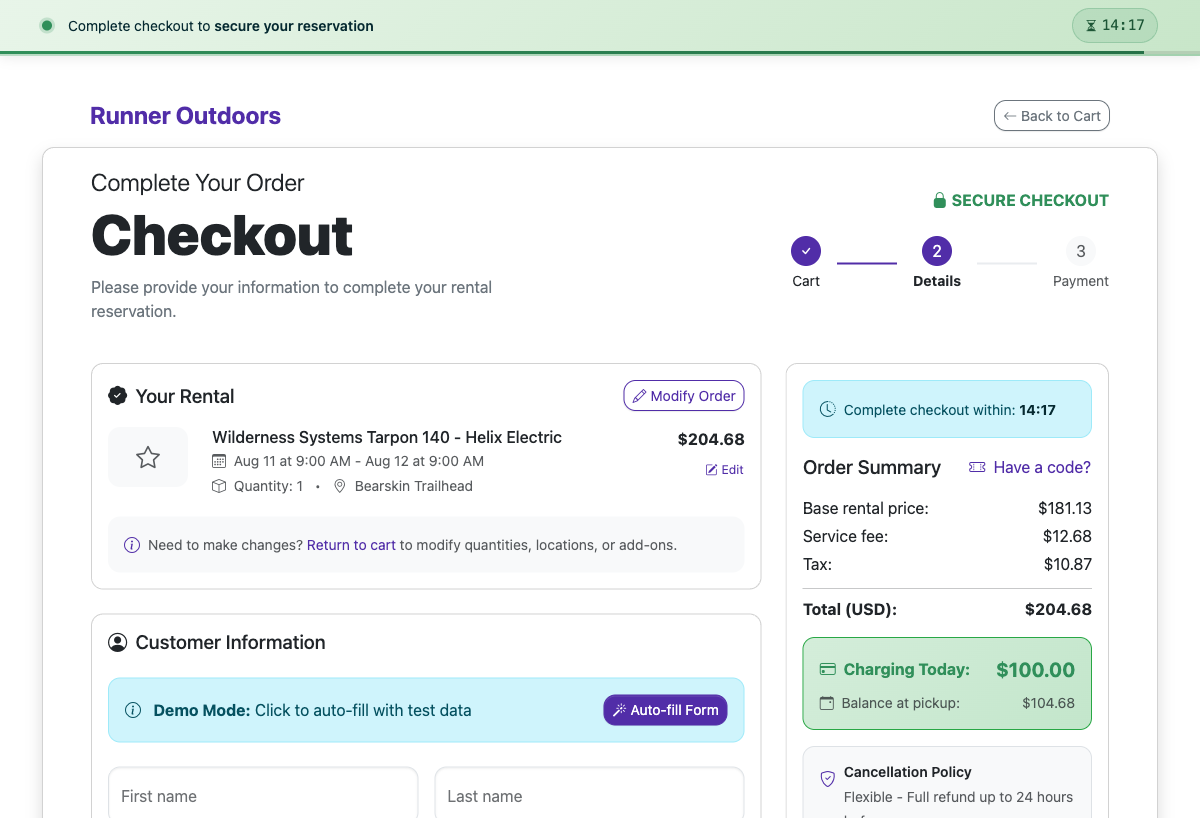
This is the current RecSystems checkout rendered from the working booking engine with a synthetic demo reservation. It shows the hold timer, complete order, fees, deposit due today, balance at pickup, and cancellation policy. The unit in the screenshot is demo data, not a claim about your fleet.
Product proof uses synthetic demo data. The workflow is RecSystems; the unit shown may not match your fleet.
Actual product UI · synthetic demo data
“Their system has completely streamlined our booking process, making it faster and more efficient. Our customers constantly comment on how easy it is to book.”
Start the booking-path assessment
Where does your booking path close?
Answer six practical questions. You receive the first blocked step immediately—no email gate and no invented revenue estimate.
Answer for the booking path your team uses today.
Your result appears before signup.
We pass only the result tier—not raw answers, business details, or PII.
Keep control
Add a complete path without removing the human one.
Phone support, staff review, and exceptions remain available. Start alongside the current process, test a real booking, and move traffic only when the path is ready.
- No forced rip-and-replace
- No unsupported revenue promise
- No hidden exception path
The offer, before you switch anything
Start at $0/month. Pay 10% only when a booking completes.
No credit card to begin. No forced rip-and-replace. Here is what the current product supports, and where a manual step still exists.
Complete pricing
$0/month
$0 setup fee
Default platform fee: 10% per completed booking, configured per account. You choose whether you, the renter, or both share it.
Exact treatment can vary by account agreement. No bookings means no platform fee.
Initial setup
Start without a credit card
Plan roughly 15–30 minutes for account, fleet, availability, and a test booking. Connecting Stripe for live payments is a separate step.
AI-assisted setup still requires you to review extracted details, pricing, and photos.
Safer transition
No forced rip-and-replace
Keep the old system for existing reservations. Import history, test Stripe, and begin with new online bookings before moving your public booking link.
The systems do not automatically sync; parallel operation is a deliberate manual transition.
Support and exit
Your data remains exportable
Export booking and financial reports. Contact wecare@recsystems.com to close the account. Rex is available in-product around the clock.
Human support is email-based, typically 1–2 hours on business days, 9:00am–5:00pm CST.
Direct answers
Frequently asked questions
What is a 24/7 rental booking system?
A 24/7 rental booking system lets customers check live availability, review pricing and policies, reserve inventory, pay the required deposit, and receive confirmation online without waiting for staff.
How does RecSystems prevent two customers from booking the same unit?
RecSystems places a temporary hold on selected inventory during checkout. The hold protects the timeslot while the renter completes payment, then the confirmed booking becomes the source of availability.
Can renters still call instead of booking online?
Yes. Online self-service adds a complete after-hours path; it does not remove phone support or the operator’s ability to review exceptions.
What does staff see after an overnight booking?
Staff see a structured booking with the selected unit and timeslot, customer details, payment or deposit status, and the confirmation already sent. Exceptions remain visible for follow-up.
What happens after you start
- 1. Create the account—no credit card required.
- 2. Add fleet, availability, and one test booking.
- 3. Connect Stripe and move traffic when ready.

One clear next step
Go home. Keep taking bookings.
Open a clear path for the customer who is ready tonight, and wake up to work that is already organized.
Map the current after-hours booking path.
Start setup — no credit card$0/month · 10% per completed booking · no credit card · launch alongside your current system
Start with the current process. Keep control of every consequential decision.